zwol

zwol
A CLI utility for sending wake-on-lan magic packets to wake up a computer in a LAN given its MAC address. Find zwol also on codeberg.
Features
- Broadcast magic packets to wake up devices on the local network.
- Cross-platform support for Windows, macOS and Linux for both x86_64 and aarch64 architectures.
Installation
Pre-compiled binaries of zwol are distributed with releases. The installation scripts below download the latest release for your processor architecture and install the program at C:\Users\%username%\.zwol on Windows and /home/$USER/.zwol on Linux and macOS. To uninstall zwol, simply delete this folder.
Windows
irm "https://raw.githubusercontent.com/rito1998/zwol/refs/heads/main/install/install-latest-on-windows.ps1" | iex
Linux
bash <(curl -sSL https://raw.githubusercontent.com/rito1998/zwol/refs/heads/main/install/install-latest-on-linux.sh)
macOS
bash <(curl -sSL https://raw.githubusercontent.com/rito1998/zwol/refs/heads/main/install/install-latest-on-macos.sh)
Usage
Wake a machine on the LAN by broadcasting a magic packet: replace <MAC> with the target MAC (e.g. 9A-63-A1-FF-8B-4C).
zwol wake <MAC>
Create an alias for a MAC address, list all aliases, or remove one.
zwol alias <NAME> <MAC> --broadcast <ADDR:PORT>   # create an alias and set its broadcast
zwol wake <NAME>                             # wake a machine by alias
The optional --broadcast (e.g. 192.168.0.255:9) is important if there are multiple network interfaces. Setting the correct subnet broadcast address ensures the OS chooses the right network interface. If not specified, 255.255.255.255:9 is used.
Use zwol ping to ping all machines by their FQDNs (if defined on alias creation) and display the result.
🟢  office-server
🔴  workstation-A
🟢  video-server
🟢  workstation-B
🔴  coffee-machine
Run zwol help to display all subcommands and zwol <subcommand> --help to display specific options.
Build
Prerequisites
- Zig (v0.16) installed on your system.
1. Clone the Repository
git clone https://github.com/rito1998/zwol.git
cd zwol
2. Build the Application
zig build
This command compiles the source code and places the executable in the zig-out/bin/ directory.
As a library
It is possible to use the wake-on-lan functionality of this project as a library.
zig fetch --save git+https://github.com/rito1998/zwol
Add the wol module from the fetched dependency in build.zig.
const wol_module = b.dependency("wol", .{}).module("wol");
exe.root_module.addImport("wol", wol_module); // e.g. add it to an exe root module
Import the module in main.zig and broadcast a magic packet.
const wol = @import("wol");

pub fn main(init: std.process.Init) !void {
    try wol.broadcastMagicPacket(init.io, "11-22-33-44-55-66", 10, "255.255.255.255:9", 1);
}
Remote wake-on-lan
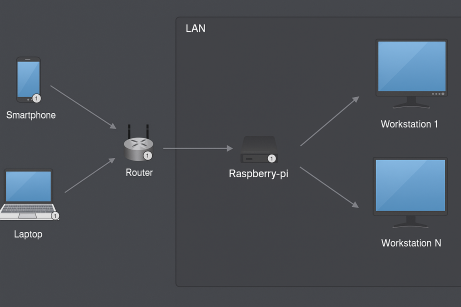
Use the subcommand relay to make zwol work as a beacon that listens on a port for inbound wake-on-lan magic packets, for example coming from a router, and relays them, usually to the LAN broadcast in order to wake devices.
zwol relay 192.168.0.10:9999 192.168.0.255:9
A realistic example usage, using the command above as a reference, is to have a home LAN comprised of one or more powerful machines that need to be woken remotely and an always-on low-power machine, like a Raspberry Pi, that runs the zwol relay repeater.
Enable port-forwarding in the router settings to forward inbound traffic from some specific port of choice to 9999/udp of the Raspberry Pi, then zwol relay service relays the magic packets on the local subnet broadcast allowing to wake the other machines from outside the LAN, provided the router public address is known.
As a service on Linux
Ensure you have zwol and set net permissions to the binary.
sudo chmod +x /home/USERNAME/.zwol/zwol
sudo setcap 'cap_net_bind_service=+ep' /home/USERNAME/.zwol/zwol
Firewall rules (based on the example above).
sudo ufw allow in proto udp to any port 9999
sudo ufw allow out proto udp to any port 9
sudo ufw reload
Create the service file, set the USERNAME and addresses accordingly.
sudo tee /etc/systemd/system/zwol.service > /dev/null <<EOF
[Unit]
Description=zwol
After=network-online.target
Wants=network-online.target
StartLimitBurst=5
StartLimitIntervalSec=60s

[Service]
Type=simple
User=USERNAME
AmbientCapabilities=CAP_NET_BIND_SERVICE
CapabilityBoundingSet=CAP_NET_BIND_SERVICE
WorkingDirectory=/home/USERNAME/.zwol
ExecStartPre=/bin/sleep 5
ExecStart=/home/USERNAME/.zwol/zwol relay 192.168.0.10:9999 192.168.0.255:9
Restart=on-failure
RestartSec=10s

[Install]
WantedBy=multi-user.target
EOF
Reload, enable and start the service.
sudo systemctl daemon-reload
sudo systemctl enable zwol.service
sudo systemctl start zwol.service
Monitor the service.
sudo systemctl status zwol.service
sudo journalctl -u zwol.service -f
License
This project is licensed under the MIT License. See the LICENSE file for details.
Star History
</a>